Boxflow nu beschikbaar als Verified App op Make.com
Boxflow is nu een officiële Verified App op Make.com. Deze integratie maakt het eenvoudiger dan ooit om je eBox- en MyMinfin-berichten te integreren met een van de 3.000 ondersteunde apps op Make.
Wat is Make.com?
Make.com is een krachtige no-code automation tool die scenario's bouwt met triggers en acties. Er is nu een door Make geverifieerde Boxflow-module beschikbaar, die ervoor zorgt dat je je berichten uit eBox Enterprise en MyMinfin eenvoudig kunt synchroniseren naar tools zoals Microsoft 365, HubSpot, Stripe of Notion, en dat zonder enige programmeerkennis.
Hoe zet ik een integratie op?
1) Een API-token genereren
Om te beginnen, moeten we je verwittigen dat het opzetten van een integratie met Make enkel mogelijk is als je een administrator bent in je Boxflow-omgeving.
We beginnen in je Boxflow-profiel: klik op je profielafbeelding en kies Profiel.
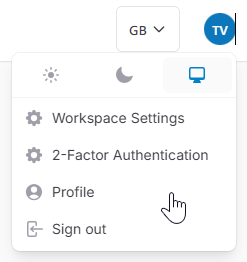
Onderaan het scherm kun je een API-token aanmaken. Kopieer het API-token, want het is maar eenmaal zichtbaar. Bewaar het veilig: met zo'n token kan iemand in jouw naam toegang krijgen tot je volledige Boxflow-omgeving.
2) Een automatisering maken
Ga nu naar je Automatiseringen in Boxflow, en maak een nieuwe automatisering aan. Je kunt eventueel Condities instellen zodat berichten enkel naar Make verzonden worden als ze aan bepaalde voorwaarden voldoen (bv. enkel voor berichten van een bepaalde afzender).
Als Actie kies je voor Webhook. Je kunt alle velden laten staan op de standaardinstellingen. Enkel de URL moeten we nu krijgen van Make.
3) Boxflow koppelen aan Make
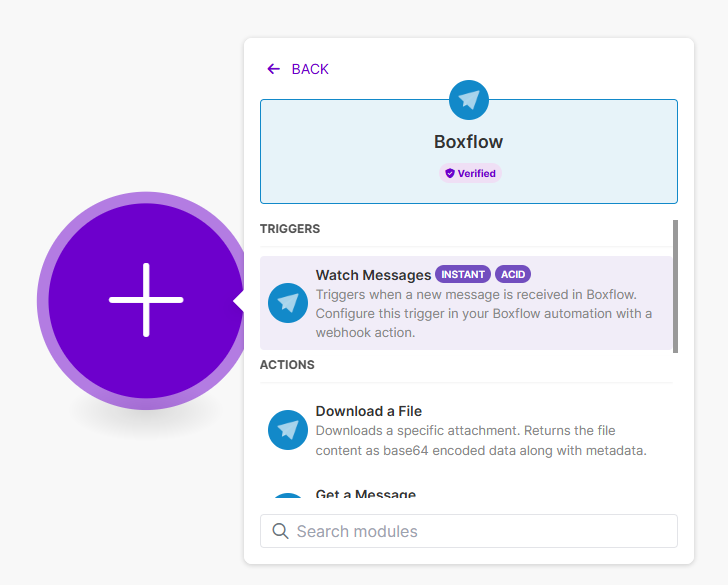
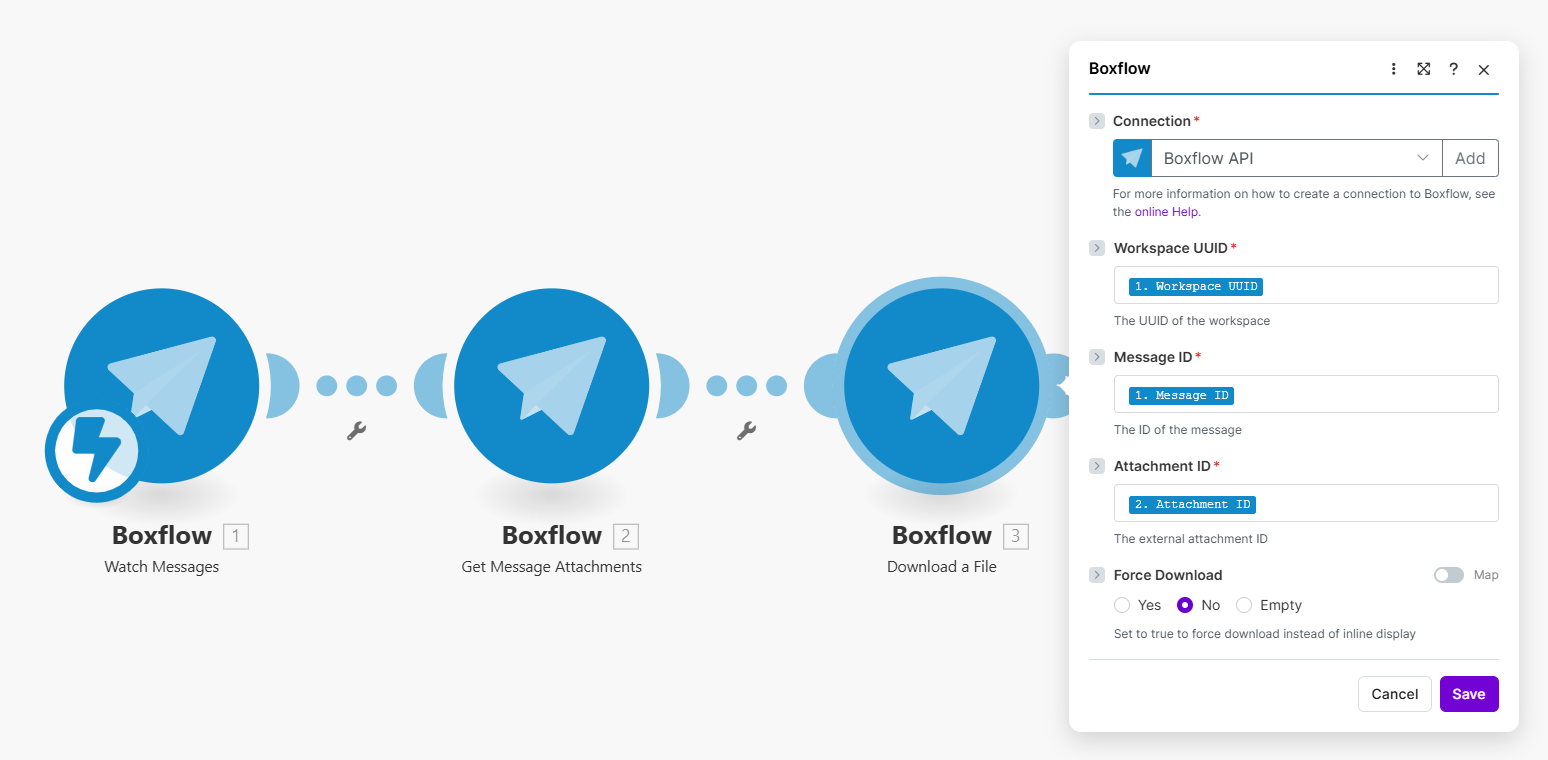
Maak een account aan op Make.com en start een Nieuw scenario. Klik op de + knop en zoek naar Boxflow. Typisch zul je drie Boxflow-modules na elkaar willen configureren:
Watch Messages: Deze module zorgt ervoor dat Make verwittigd wordt van zodra er een bericht beschikbaar is in Boxflow. Als je op deze module klikt, kun je een nieuwe webhook aanmaken, en het adres dat je dan krijgt, kun je plakken in het URL-veld van je automatisering in Boxflow.
Get Message Attachments: Haalt op welke PDF-documenten bij het bericht horen. De velden in deze module kun je linken aan de waarden uit de vorige module.
Download a File: Downloadt de PDF-documenten in kwestie. De velden in deze module kun je linken aan de waarden uit de vorige twee modules.
4) Koppelen aan jouw apps
Vervolgens kun je heel wat applicaties gaan koppelen die standaard door Make ondersteund worden. Zo kun je bijvoorbeeld:
Berichten automatisch uploaden op je Google Drive, Dropbox, OneDrive, of Sharepoint
Berichten rechtstreeks verzenden naar een CRM- of boekhoudpakket, zoals HubSpot, PipeDrive of Exact Online
Berichten bezorgen op een (S)FTP-server bij jou op kantoor
Een notificatie krijgen in Teams, Slack of een ander kanaal
AI-modules zoals ChatGPT koppelen die de inhoud van de berichten kunnen samenvatten, vertalen of interpreteren
De mogelijkheden zijn in de praktijk eindeloos, want Make beschikt ook over een generieke HTTP-module, waarmee je quasi elk pakket dat over een API beschikt, kunt linken.
Lijkt het je toch wat te technisch?
Make beschikt over een uitgebreid partnernetwerk waar je beroep op kunt doen om je te helpen bij het bouwen van je integratie. En bij Boxflow zelf zijn we zelf ook een dagelijkse gebruiker, dus aarzel niet om ons te contacteren. We helpen je graag verder, van een technisch vraagje tot het volledig opzetten van de integratie die je voor ogen hebt.